I stopped only watching what my AI agent opens. Here is what I put in its way.
On 11 September 2026 a helper brought part of one of my API keys, the codes that connect your app to services like payments or AI, into my conversation. A helper is a second AI that your agent starts on its own, to work on one task out of your sight. My agent’s instructions said never to open the file with my API keys. The helper never saw that rule. I wrote about how that happened.
Then I built agentwhy. It reads the saved records your AI agent, like Claude Code or Codex, already keeps on your computer, and shows which private file was opened, from which task, and which key to change. Since then I have changed the order of what it does.
A report always comes after
A report tells you what happened. By the time you read it, the key is already in your chat, in the saved record on your computer, and with the AI company. The only fix left is a new key.
When I posted the story on Reddit in October, the four comments under it were all about keeping keys away: keep them out of the folder the AI works in, use references from a password manager instead of real keys, check each step before it runs, and don’t paste keys. Nobody asked how to check afterwards. People wanted the way in closed.
So agentwhy now starts by stopping, and the report is the last step. Its job is narrower: show what got past the rest.
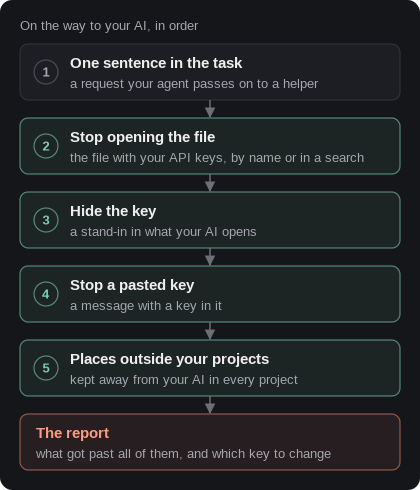
Below is each step, in the order a key meets it, with what it catches and what it misses. I measured all of it on a Mac. None of it is a lock.
1. One sentence in the task
The same day as the leak, my agent started another helper with a similar question about a different key. This time it added one line to the task: “do NOT read or report any actual secret VALUES”. That helper answered “the key exists”, and nothing more.
A helper sees its task and nothing else, not your instructions. So for a helper, the task is the only rule there is. The sentence says read, not only report: “don’t show me the value” still lets the helper open the file. And it is still a request. It holds only when your agent remembers to pass it on.
2. Stop the obvious attempts to open the file
When you set agentwhy up in a project, it adds a few lines that stop your AI from opening your private files: the file with your API keys and a few others like it. You can add your own. It shows you the exact lines and asks first.
The lines cover the way your AI opens files itself, and the commands it runs on your computer. A command that names the file with your API keys is stopped, and so is a search through a folder that holds it.
That second part is the one that would have mattered in September. The helper’s search named no file, so a rule that only knew the file’s name had nothing to match. A search through the folder that holds the file now has something to match.
It still misses a file name your AI puts together while it works, a small program it writes and runs, and a command it hands on to another program. In September I tried stopping a list of commands by name. One line written another way printed the whole file.
3. Hide the key in what your AI opens
A key can sit in a file you never marked as private, like a settings file. With hiding keys on, agentwhy swaps each key it recognises for a stand-in before your AI sees it. The file on your computer stays as it is.
On your computer
secret_key: sk_live_…
A line in a settings file, payments.yml. An example: the key is made up and cut short.
What your AI sees
secret_key: [redacted by agentwhy]
Your AI is told a key was hidden, so it leaves that line as it is.
Hiding keys is on for a project you set up on agentwhy’s welcome page, and one switch in Settings turns it off. It works in Claude Code. In Codex, it hides a key in what a command printed.
It doesn’t catch a key it doesn’t recognise, part of a key, a key written in an unusual way, or a file you attach to a message. In Claude Code, a key in a step that fails gets through too. Each step of your AI also takes about half a second longer. It lowers the risk. It doesn’t remove it.
4. Stop the key you paste yourself
Not every key gets to your AI through a file. Sometimes you paste a block of settings into a message so your AI can set something up, and a live key is in it. agentwhy stops that message before your AI gets it, and says what to do instead:
What agentwhy shows you
agentwhy blocked this message before your AI read it: it holds an OpenAI key (line 1). Put it in .env as OPENAI_API_KEY, and send the name instead.
On the screen, .env is the file with your API keys.
You send the name, your AI works with the name, and it never sees the key. agentwhy knows the keys of common services by their shape. A sample key passes.
Claude Code and Codex still keep the stopped message, key included, in their own saved records on your computer. Some apps, like Codex’s desktop app and its panel in VS Code, name a new chat from its first message even when that message is stopped, so there the key may already have been sent to the AI. agentwhy says so, and you change the key. A key it doesn’t recognise goes through. If the check itself breaks, the message goes through too.
5. Keys that belong to no project
Some keys sit in no project at all, like the ones that let your computer sign in to a server or a cloud account. A project’s lines can’t reach them. One command keeps such a place away from your AI in every project on your computer. I measured this in Claude Code in a terminal. The Claude app, VS Code and Windows aren’t measured yet.
Last: the report
Every step above has a gap, and some ways in no rule can see. So the report stays. It just moved to the end.
agentwhy reads your saved records from the last 7 days, on your computer, with no internet and no AI. It lists which private files were opened, by which helper, from which task, and which key to change. It never shows the key itself: keys are left out before the report is built.
I measured it on 29 conversations I scripted in Claude Code, each one a way a key can travel, the ways it misses included. Where a key came into the conversation, it said to change the key in 14 of 18. It named the helper’s task in 5 of 5. No key showed up in any of the 29 reports. These are ways I wrote, not a rate from real computers. The misses, and why, are in the repository.
What actually holds
This is my conclusion, not a measurement. Only two things hold against every way in: keeping keys out of plain files on your computer, or a setting that controls which files anything can open, at the level of the whole computer. Everything above makes the obvious ways harder, and tells you when one got through anyway.
If a key did reach a conversation, change the key at the service it belongs to. Deleting the chat doesn’t take it back.
For developers
npx @agentwhy/cli initaddspermissions.denyrules for Claude Code’s file tools and aPreToolUsecheck on Bash that refusescat .env,grep -rover a folder holding a private file, and globs such ascat .env*. The same check runs in Codex. Private by default:.env*,*.env,.npmrc,secrets/,.ssh/,id_rsa*; add your own with--protect "config/*.pem".- It misses a path built at runtime, a script, and a command handed to another shell (
sh -c '…'). In September, withcat,grepandheaddenied in Bash,python3 -c "print(open(...).read())"printed the whole file, and a read refused bypermissions.denyfired no hook. - Hiding keys:
init --hide-keys, aPostToolUsehook in Claude Code; in Codex, a hook in your own~/.codexfor what a shell command printed. - A pasted key is stopped by a
UserPromptSubmithook. The blocked prompt still stays in the transcript (in Codex, also in~/.codex/history.jsonl). - Outside a project:
npx @agentwhy/cli protect "~/.ssh/**". - The report:
npx @agentwhy/cli, Node 22 or later. No network; the page is served on127.0.0.1. - What holds against the shell route: an OS-level sandbox (
sandbox.filesystem.denyReadin Claude Code), or a secrets manager, so there is no plain file to read.
Try it
Open Get started, pick the app you build in, and paste one line. A page opens on your own computer: that is where you set up the steps above, and where you see what your AI has already opened.
Which of these steps do you already have, and which way in would get past all of them?
agentwhy is free. See the license. If it missed something in your conversations, I’d like to know: write to me or open an issue on GitHub.