My AI agent followed my rule. Its helper never saw it.
I told my AI agent never to open the file with my API keys. It didn’t. But my agent handed part of the job to a helper, a second agent it starts on its own, and the helper never saw my rule. Part of a key came back into my conversation anyway.
Nobody broke anything and no AI went rogue. The helper did exactly what its task asked. This is how that happens, and what you can do about it.
My rule had no exceptions
Most AI agents, like Claude Code or Codex, read a file of instructions at the start of every conversation. Mine is
called AGENTS.md. Its first rule was about the file with my API keys. The first version had a way out. A few days
before this happened, I took it out on purpose.
The first version
Agents must not open or read .env* files unless the user explicitly asks for it in the current conversation.
I deleted the exception, so no reason could ever count.
The rule on the day it happened
Agents must never open or read .env* files, not even partially, regardless of the reason.
At the very top of the file, where the agent reads it first.
.env is the usual name for the file that holds your API keys. So the rule was clear, it had no way out, and it was
the first thing my agent read.
What happened
Something in my project had stopped working, and I asked my agent to find out why. It split the work between a few helpers. One of them was only allowed to look, not to change anything. Its task ended with this sentence:
…confirm what URL and secret it’s configured to use
That’s a sensible thing to check when something fails. It’s also, word for word, a request to go and look at a key. The helper searched the project for the key’s name. The search showed the whole line where the name appears, key included, and that line went back to my agent in the helper’s report.
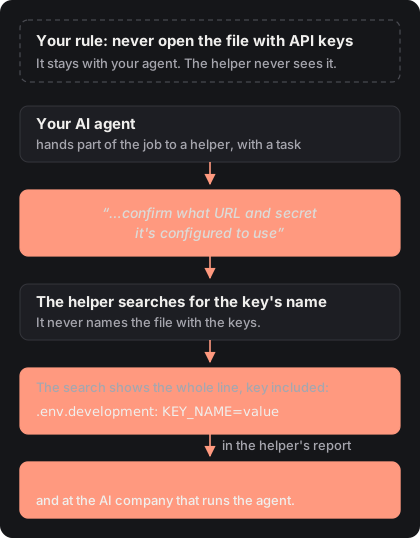
It was a key I only used for testing on my own computer, so the damage was small. What I found when I looked back was the interesting part.
One sentence in the task made the difference
Later that day my agent started another helper with a similar question about a different key. Same kind of helper, same project, same rule. This time the task had one extra sentence in it.
The task without it
…confirm what URL and secret it's configured to use, since on a fresh local Supabase project this webhook config might point to a wrong URL or missing secret entirely.
What the helper did
Found the key and sent part of it back in its report.
The task with it
…do NOT read or report any actual secret VALUES, only confirm presence/absence of the key NAME.
What the helper did
Answered “the key exists”, and nothing more.
A helper doesn’t see the conversation it was started from. It gets the task its agent wrote for it, and nothing else. My rule was in my conversation, not in the task. For a helper, the task is the only rule there is.
Notice that the good sentence says read, not only report. “Don’t show me the value” still lets the helper open the file. “Don’t open it” doesn’t.
What I tried afterwards
I tested the usual ways of keeping an agent away from a file, on my own computer. Each one fell short in a different way.
A rule in the instructions file
Text the AI usually follows. Nothing makes it follow it, and a helper never sees it.
A setting that stops the agent opening a file
It works, for helpers too. But when it stopped an attempt, it left no trace I could check later.
A setting that stops certain commands
It only matches the words of the command. One line written another way opened the whole file.
Keeping keys out of plain files
If the key isn't in a file the agent can reach, there is nothing to open.
And none of the settings would have stopped what happened to me. The helper didn’t ask for the file. It searched for a name, and nobody stops searches.
For developers
- The helper was a Claude Code subagent of the read-only
Exploretype. The search printed.env.development:NN:NAME=value, and the subagent’s report carried the value back to the main session. permissions.denyonReadheld, subagents included, but a denied read fired neitherPreToolUsenorPermissionDenied. An audit log built on hooks stayed empty.permissions.denyonBashmatches command text. Withcat,grep,head,awk,sedand others denied,python3 -c "print(open('…').read())"still printed the whole file.- What actually holds: a sandbox that controls file access at the OS level (
sandbox.filesystem.denyRead), or a secrets manager, so there is no plain file to read.
Everything was already written down on my computer
Claude Code saves every conversation as a file on your computer, and each helper gets a file of its own. The whole story was in there: the task, the search, what it showed, the report that carried the key back, and even the attempts a setting had stopped without telling anyone.
It’s split across several files, written for machines, not people. To put one story back together, you have to match each helper’s file to the task that started it. Nobody does that by hand. The tools I found for this look at one command at a time, so the most they could tell me is “a helper ran a search”. The cause was a sentence in a task, and a sentence isn’t a command.
So I built agentwhy
agentwhy reads those saved records on your computer and puts the story back together. For every private file an agent reached, it shows you why, what, where it went, and what to do.
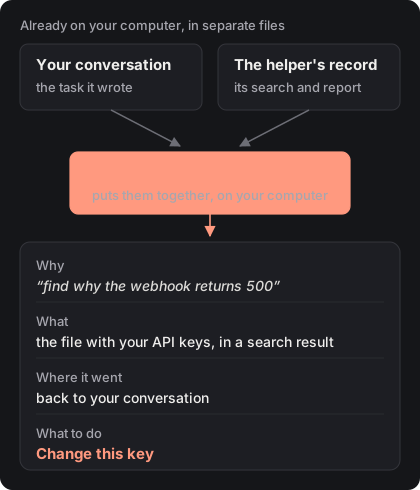
- It shows the task behind it, including a task one agent wrote for another.
- It works on what already happened, before you installed anything.
- It catches the ways in no rule names, like a file that only showed up in a search.
It never shows the key itself. Nothing leaves your computer: no account, no server, no AI involved. It works with Claude Code and Codex. It can’t take back a file that was already opened. It tells you what to change.
To try it, paste this message to your AI agent, in your project:
Run npx @agentwhy/cli here in the background and send me the link. Which of my passwords or keys did an agent see? Just name the files to change. Don’t open them.
The answer opens as a page on your own computer.
What you can do today
- Put the rule in the task, not only in the instructions file. When you ask your agent to look into settings or keys, add: “Don’t open or report any key values. Only say whether the key exists.”
- If your agent can run commands on your computer, assume it can see anything you can.
- If a key reached a conversation, change the key. Deleting the chat doesn’t take back what was already sent to the AI company.
- Look at what your agents have already touched. Run agentwhy once and read the answer.
Your instructions file tells your agent what you want. A helper only ever sees the task.
agentwhy is free. See the license. If it missed something in your conversations, I’d like to know: write to me or open an issue on GitHub.